
How to check an MM2 trade from a screenshot: three ways, fastest first
By MM2 Trade Hub TeamPublished 6 min read
Most bad trades are not scams. They are accepted in a hurry: the offer looked about right, the timer was running, and nobody added up the other side. A picture of the trade window fixes that, because a picture can be priced. This guide covers the three ways to turn a screenshot or a photo of an MM2 trade into two totals and a verdict, and what to look at once you have them.
1. Scan it with the app
The quickest way is to let your phone read the picture. Our free app has a scanner on the Calculator tab. You give it a screenshot, or point the camera at the screen, and it finds every item on both offers, prices them and shows the result.
- Open the Calculator tab and tap Scan a trade with camera.
- Pick Screenshot or Camera. If you play on the same phone, take a screenshot in the game first. If you play on a PC or console, photograph the screen.
- Crop to the trade window so the box holds YOUR OFFER and THEIR OFFER, then tap Scan this area.
- Read You give and You get. Fix anything marked with a question mark, and the verdict appears: win, fair or lose, with the gap as a percentage.
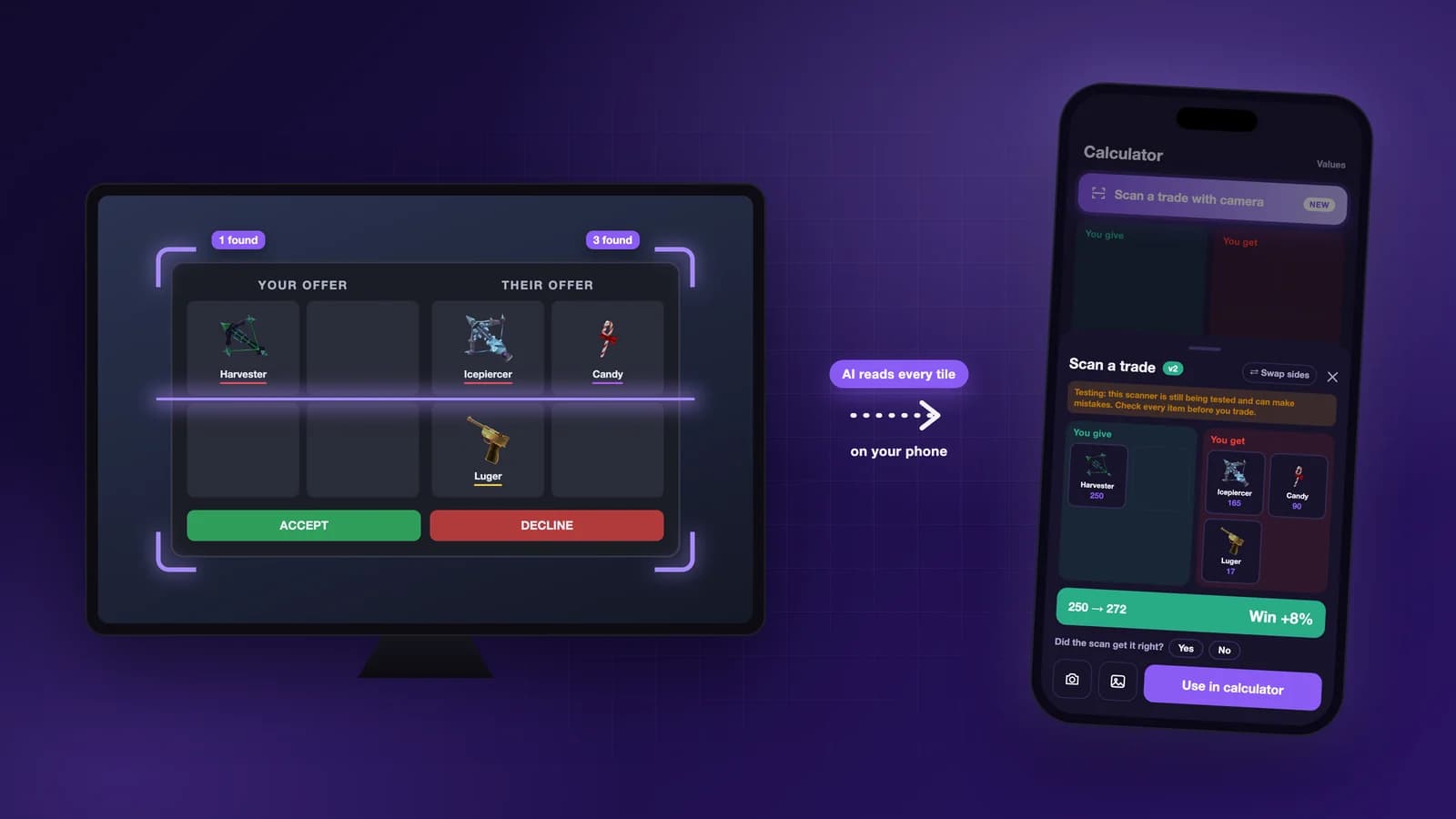
The picture is read on the phone and is not uploaded. The scanner is still marked as being tested, so treat it as a fast first pass and check the items it shows against the window.
2. Type it into the trade checker
At a computer, the trade checker on this site does the same sum by hand. Add the items on your side, add theirs, and it gives both totals and the same win, fair or lose verdict the app uses. It also lets you switch between the MM2Values.com list and Supreme Values, which matters more often than people expect; the lists compared guide shows how far apart they get.
Typing is fine for a one for one trade. It gets slow, and easy to get wrong, when each side has three or four items and a stack count. That is the case the scanner was built for.
3. Ask the Discord bot
If the offer arrived in a Discord chat, you can stay there. Our Discord bot answers /wfl with both totals and a verdict, and /value for a single item. It works in a server and in your own DMs with the bot, so you do not have to post the trade in public to check it.
A worked example, priced right now
Someone offers Sunrise (800) and Heart Wand (350) for your Sakura (1,150). Whichever of the three ways you use, the sum is the same: you give 1,150 and get 1,150, a gap of 0%, which the checker calls fair for you.
Now the part no total shows. You are giving one item and getting two. One strong item is usually easier to trade onward than two smaller ones that add up to the same number, which is why traders ask for a little extra, called adds, when they break a big item into small ones. Of the two you would receive, the lower demand score is 4, and Sakura sits at 4.5. If the item you are giving is the more wanted one, a result that is only fair on paper is a small step down in practice. The demand guide explains how to read those scores.
Four checks after you have the totals
Is it the same list on both sides?
A verdict only means something when both sides are priced from one list. If the other player quotes a number you do not recognise, ask which list it is from before you decide who is right.
How wanted is what you are getting?
Value says what an item is listed at. Demand says whether anyone will give you that for it. A small loss into a high demand item can be the better trade; a win into items nobody asks for can sit in your inventory for weeks.
Is anything moving?
An item that just rose may keep rising or fall back. Each item page here lists the dates its value changed, and the weekly market report shows what moved this week.
Does the window still match the picture?
This is the one that costs people godlies. In the view and switch scam, the other player shows the item you agreed on, then swaps it for a look-alike just before you accept. A scan prices the window at the moment you took the picture. Look at the window again, item by item, in the last seconds before you press accept.
A screenshot someone sends you is not the trade
Pricing a picture a stranger sent is useful for deciding whether to bother. It proves nothing about what they own or what they will put in the window. Pictures get cropped, reused and edited. The only trade that counts is the one on your own screen, inside the game. More on this in the trading safety guide.
Getting a picture that scans well
- A screenshot beats a photo every time. Use one whenever the game is on the same device.
- For a photo of a monitor, hold the phone straight and the same way up as the screen.
- Get close enough that the trade window fills most of the picture, with both offers inside.
- Avoid reflections of lamps and windows on the screen. A slight tilt usually clears them.
- Close your inventory list first if you can, so only the two offers are in view.
Checking a trade from a screenshot: FAQ
Can I check an MM2 trade from a picture someone sent me?
You can price it, yes: scan it or type the items into the trade checker. Treat the answer as a price for the picture, not for the trade. A screenshot can be old or edited, and only the live trade window on your own screen shows what you will really receive.
What is the fastest way to check a trade before the timer runs out?
On a phone, the scanner: one picture and both sides are priced. If you are at a computer with the site already open, the trade checker is quick for two or three items. For a big trade with eight items, the scanner saves the most time.
The scan says win. Should I accept?
Look at two more things first: how wanted the items you are getting are, and whether the trade window still shows the same items as when you scanned. A win made of items nobody asks for is slow to trade onward, and a swapped item turns any win into a loss.
Why does my friend's checker give a different result for the same trade?
Most likely it is priced from the other community list. MM2Values.com and Supreme Values disagree on a lot of items, and a trade can be a win on one and fair on the other. Agree which list you are both using before you argue about the verdict.
Does the scanner work on a screenshot from a phone and from a PC?
Both. A screenshot is the cleanest input wherever it was taken. A phone photo of a monitor also works, with more care: straight, close, and without glare.
Keep reading
MM2Values.com vs Supreme Values
MM2Values.com and Supreme Values do not agree, and we carry both on every item page. Here is how big the gaps get, which items cause them, and what to do when someone quotes you a different number.
Updated Sep 13, 2026 · 8 minHow to trade in MM2
Start here if you have never traded. How the trade window works, how to make an offer people actually accept, and a realistic path from a pile of commons to your first godly.
Updated Oct 31, 2026 · 10 minHow MM2 values work
What a value actually is, where the numbers come from, and what the demand and stability tags really tell you. The guide behind every number on this site.
Updated Sep 5, 2026 · 8 minFound a number that is off, or an example that no longer holds? Tell us on the contact page. We fix guides when the market moves and log the bigger changes on the About page. How we source and write everything is in our editorial policy.